
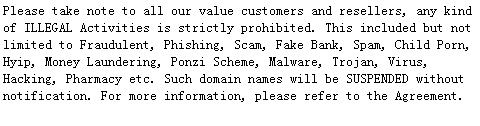
As a LovingDomains Reseller, you may use the Bulk Suspension / Unsuspension tool to Suspend / Unsuspend multiple Orders belonging to your Customers and / or Sub-Resellers. Typically, you may need to Suspend Orders in response to abuse complaints or when you have not received payment towards an Order purchase/registration, renewal, transfer, etc.
Features of Order Suspension
-
Suspending a domain name would result in disruption of all services associated with a domain name such web hosting, email hosting, etc..
-
The Contact Details and Name Servers of such a domain name can not be modified in this state.
-
A Transfer [Away] Request for this domain name to another Registrar will fail at the Registry itself and will not be allowed.
-
Order Renewal and Deletion would not be possible.
-
An (Internal) Move/Push/Transfer of this Order to another Customer Account would not be possible in this state.
-
An Order Suspended by you, can only be Unsuspended by you or LovingDomains.
-
You will not be able to Unsuspend an Order Suspended by LovingDomains.
-
A Customer can not Unsuspend an Order under any circumstance.
Suspending / Unsuspending Orders Individually
-
How to Suspend / Unsuspend Single Domain Linux Hosting Orders Individually?
-
How to Suspend / Unsuspend Single Domain Windows Hosting Orders Individually?
-
How to Suspend / Unsuspend Multi Domain Linux Hosting Orders Individually?
-
How to Suspend / Unsuspend Multi Domain Windows Hosting Orders Individually?
-
How to Suspend / Unsuspend Email Hosting Orders Individually?
-
How to Suspend / Unsuspend Enterprise Email Orders Individually?
-
How to Suspend / Unsuspend Legacy Web Hosting Orders Individually?
-
How to Suspend / Unsuspend Website Builder Orders Individually?
LovingDomains does not support the Bulk Suspension / Unsuspension feature for domain names under the following TLDs (extensions):
-
Due to restrictions imposed by the Registry Operator:
-
.CA
-
.ES
-
.EU
-
.UK
-
-
Due to other restrictions:
-
.ASIA
-
.AU
-
.CN
-
.CO
-
.DE
-
.ME
-
.NL
-
.NZ
-
.RU
-
.TEL
-
To Suspend / Unsuspend Orders in Bulk
-
Login to your Reseller Control Panel. See details
-
Here, you have two options:
-
Select Orders from a list:
-
In the Menu, point to Products and then click List All Orders. This would list all Orders under your Reseller account.
NoteYou may choose to search for specific Orders to Suspend / Unsuspend, by selecting one or more of the following parameters and clicking the Search button:
-
Belonging to: You may choose to view Orders associated with a domain name or belonging to a Customer or a Sub-Reseller. Choose the appropriate option from the drop-down menu and mention either the domain name / Order ID or the Customer Username / ID or the Sub-Reseller Username / ID.
-
For Product: Select the desired Product from the drop-down menu.
NoteIn order to search for Single Domain Linux Hosting and/or Single Domain Windows Hosting Orders, select the option as Single Domain Hosting.
In order to search for Multi Domain Linux Hosting and/or Multi Domain Windows Hosting Orders, select the option as Multi Domain Hosting.
Similarly, in order to search for Reseller Linux Hosting and/or Reseller Windows Hosting Orders, select the option as Reseller Hosting.
-
With Status: Select the status as Active or Suspended. Generate a list of Active Orders to use the Bulk Suspension tool and list of Suspended Orders to use the Bulk Unsuspension tool.
-
Expiry: You may choose to list Orders based on their Expiry status. Select Any, Expired or Expiring in certain number of days.
-
Purchased between: You may choose to list Orders based on their purchase date. Select the Start Date and End Date to search within this date range.
-
Include Sub-Reseller's results: You may include in the list all Orders belonging to your Sub-Resellers, by selecting this check box.
-
-
Select the Orders you wish to Suspend / Unsuspend and then click the
 /
/  button.
Note-
You may also provide a list of domain names / Order IDs / Customer IDs / Reseller IDs in the Bulk Actions page, which can be reached by clicking the
 icon in the List of Orders page.
 -
In order to Suspend / Unsuspend more than 50 domain names, you need to increase the number of domain names listed per page from the Results/Page drop-down menu.
-
-
Enter a list of Orders:
-
In the Menu, point to Products -> Bulk Tools and then click Bulk Suspend/Unsuspend.
-
Enter a list of Domain Names, Order IDs, Customer IDs or Reseller IDs. You can mention upto 1000 Domain Names, Order IDs, Customer IDs or Reseller IDs on separate lines.
Selecting Customer IDs or Reseller IDs allows you to Suspend/Unsuspend all Orders under the specified Customer(s) / Sub-Reseller(s).
-
Click the
/ button.
-
-
-
You would be displayed a Bulk Suspend / Unsuspend Summary view, alongwith the total number of Orders in the Bulk Suspend / Unsuspend Action.
NoteInvalid Orders or Orders not found under your Account will be segregated from your list. Such Orders can be viewed through the appropriate link(s) displayed on the Bulk Suspend / Unsuspend Summary page.
Invalid Orders include:
-
Orders Suspended by LovingDomains
-
Orders Locked by LovingDomains
-
Orders of TLDs (extensions) for which Suspension is not supported
-
Orders under Redemption Period
-
Inactive Orders
-
Suspended Orders included in the Suspension list or Active Orders included in the Unsuspension list
-
-
While placing a Bulk Suspension Action, select the exact Reason For Suspension as:
-
AUP violation: In case the Order is in violation of the terms and conditions of the Acceptable Usage Policy
-
Malware: In case the Order is involved in malware distribution
-
Phishing: In case the Order is involved in phishing activity
-
Scam/Fraud: In case the Order is involved in the running of some scam or fraudulent schemes
-
Spam: In case the Order is involved in spamming activity
-
Non-payment: In case you have not received payment towards an Order purchase/registration, renewal, transfer, etc.
-
Chargeback: In case you have received a chargeback against an online payment made towards an Order purchase/registration, renewal, transfer, etc.
-
Risk Assessment: In case you are verifying the details of an online payment made towards an Order purchase/registration, renewal, transfer, etc.
-
Child Sexual Abuse Material (CSAM): Hosting, distributing or linking to CSAM or content that is harmful to minors
-
Rogue Pharmacy: In case the Order is involved in hosting of illegal, unlicensed pharmacies
-
Whois Inaccuracy: In case the Contact details of the domain name are inaccurate
-
Registered in bad faith: In case of an ongoing trademark-based domain name dispute
-
Trademark/copyright violation: In case of an ongoing trademark-based domain name dispute or use of copyrighted content
-
Court order: In case you have received a court order
-
Other: Select this option if you wish to provide your own reason for Suspension
The reason will visible to only your immediate Customer / Sub-Reseller from within their Control Panel, in the Suspend Action details page.
Additional InformationSelect the Remove all suspension by Sub-resellers checkbox if while Unsuspending Orders, you also wish to remove any/all Suspension(s) placed by your Sub-Resellers on these Orders.
-
-
Click the Suspend / Unsuspend button to place a Bulk Suspend / Unsuspend Action.
Tracking your Bulk Suspend / Unsuspend Action
-
You can track the status of your Bulk Suspend / Unsuspend Action from the Running Bulk Actions page.
Additional InformationListing all Bulk Actions that are currently running in your Account
-
You will receive a detailed report of your Bulk Suspend / Unsuspend action once the process completes.
At any point of time, you can add upto 2 Bulk Actions. This implies that you would not be able to add another Bulk Registration / Transfer / Renewal / Suspend or Unsuspend / Lock or Unlock / Name Servers Modification / Theft Protection / Privacy Protection Action, if 2 Bulk Actions are already running. You will encounter the below error message in case you try to do so:
You already have the maximum allowed number of Bulk Operations running. Please wait for at least one to complete before starting another.
You will be able to add another Bulk Action once one of the earlier actions has been processed completely.